Comparisons
AVIF vs WebP: Which Should You Use?
AVIF vs WebP is not a contest between old and new. It is a workflow decision about efficiency, compatibility, and how much complexity your stack can support.

Choose AVIF or WebP after a matched-source test
If your team wants a straightforward modern default, WebP is usually easier to operationalize. If you are actively optimizing media pipelines and compatibility is covered, AVIF can be the more aggressive choice.
The useful tie-breaker is operational
When two exports both look good, ask which one the site can generate, preview, cache, and debug consistently. AVIF may win the byte comparison, while WebP may win the five-minute test of opening the file in every tool the team actually uses. A format that saves bytes but breaks the editorial workflow creates a different performance problem: people stop using the pipeline.
For beginners, start with WebP as a broadly practical web format and test AVIF on important photographic assets where the saving is meaningful. Keep a fallback and the original source. There is no medal for making a 6KB icon 1KB smaller while doubling the complexity of the page.
Where AVIF wins and where WebP stays practical
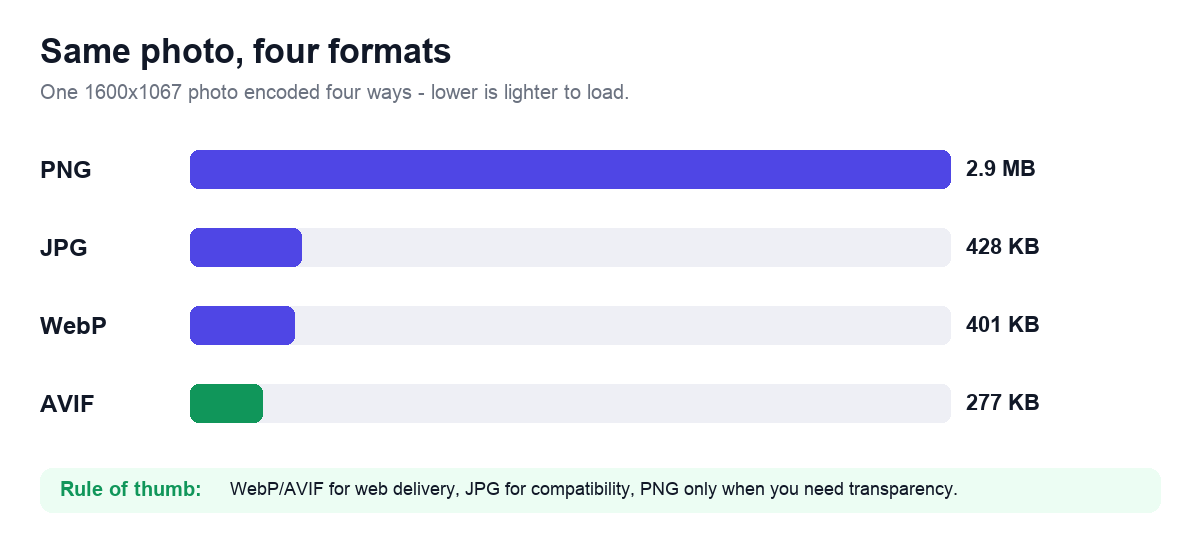
AVIF can deliver stronger compression gains in many cases, especially for photo-heavy web assets. WebP stays practical because it is widely supported, easier to work with, and already strong enough for many real publishing needs. That means AVIF is often a performance-forward option, while WebP is the safer operational default.
The best choice depends on whether the site is ready to support AVIF cleanly across tooling, browser needs, testing, and editorial workflows.
- AVIF for stronger compression when the stack is ready for it.
- WebP for a simpler, broadly practical modern default.
Measure the saving and the operational cost
Format names do not determine file size by themselves. Dimensions, encoder effort, chroma handling, bit depth, alpha, and quality settings all matter. Compare AVIF and WebP exports from the same original at a visually matched result.
WebP often encodes quickly and works well as a broad modern default. AVIF can preserve gradients and reduce some photographs further, but the gain varies and slower encoding can matter in interactive or high-volume workflows.
Graphics with sharp colored edges deserve a separate test because chroma subsampling and lossy settings can fringe small text or logos. Use lossless output or higher-fidelity chroma when the encoder supports it and the visual difference matters.
Content libraries, build pipelines, and fallbacks shift the answer
A media-heavy landing page may benefit from AVIF if the pipeline supports it cleanly.
A CMS with mixed contributor workflows may find WebP easier to manage consistently.
A screenshot library may need a different decision than a photo-heavy hero library.
A practical conversion checklist
Use this sequence for a product or blog image and derive the values from the real layout:
- Resize from the original to the largest useful rendered width.
- Keep or remove metadata according to privacy and color needs.
- Create a WebP baseline and inspect difficult visual details.
- Create an AVIF version from the same original and compare at matched visual quality.
- Keep AVIF only where the saving is meaningful for the page.
- Provide the fallback required by the actual audience and integrations.
- Measure the live page instead of predicting LCP from image bytes alone.
Compression savings versus operational cost
Both formats can support faster pages, but only when the implementation is stable and the rest of the image workflow is disciplined.
Teams should choose the format their pipeline can support predictably, not just the one with the strongest benchmark headline.
AVIF-versus-WebP comparisons that mislead
- Choosing AVIF before verifying actual browser and workflow support.
- Assuming WebP is outdated because AVIF exists.
- Ignoring dimension and crop discipline while debating the last few compression gains.
- Treating all content types as if they benefit equally from the same modern format.
Frequently Asked Questions
Is AVIF always smaller than WebP?
No. AVIF often performs well on photos, but the result depends on the image, encoder, dimensions, and quality target. Compare actual outputs.
Which format is easier for beginners?
WebP is often the simpler modern default because support and tooling are mature. AVIF is worth testing when its saving justifies the added workflow.
Can both AVIF and WebP use transparency?
Yes, but confirm that your encoder and publishing path preserve the transparency correctly.
Related Tools


Sources and related reading
For browser image-format capabilities and tradeoffs, consult MDN image file type and format guide. For a hands-on companion to AVIF vs WebP: Which Should You Use?, continue with AVIF vs WebP vs JPG guide.