ImageConverterTool
100% browser-side for routine tools • No signup • Privacy-first

Comparisons

Best Image Format for Websites in 2026

The best image format for websites in 2026 is usually the one that matches the content, layout, and browser reality of the page, not the format that sounds most advanced in a headline.

Why this comparison matters

Best Image Format for Websites in 2026 is a practical question for publishers, site owners, ecommerce teams, and marketers. People rarely ask it because they want a theoretical lesson in image formats. They ask because a page is slow, a social preview looks wrong, a platform rejects a file, or an asset that looked fine in design software behaves badly once it reaches a website or app. This article is written to solve that exact problem by tying the comparison to real publishing decisions instead of repeating a generic definition of each format.

The most useful starting point is to define the job before picking the format. If the image is a photo, if it needs transparency, if it has text or hard edges, if it is heading into a browser, and if mobile performance matters, the answer changes. That is why this comparison article moves from decision criteria to specific examples and then back into the tools that help you act on the recommendation.

Default recommendation

For many everyday website images, WebP is the strongest default because it is efficient, flexible, and widely usable in modern publishing workflows. That recommendation is not presented as a universal rule because image workflows fail when they oversimplify. A format that is ideal for a blog thumbnail can be a bad choice for a logo, a print handoff, a WhatsApp display picture, or a CMS that still expects older defaults. The goal is to make the decision faster while keeping the exceptions clear.

A good comparison article should also explain what happens after the format decision. The right output still needs sensible dimensions, moderate compression, descriptive file naming, and alt text that matches the content. Format choice is a lever inside a broader SEO and UX workflow, not a standalone ranking trick.

JPG vs PNG vs WebP vs AVIF

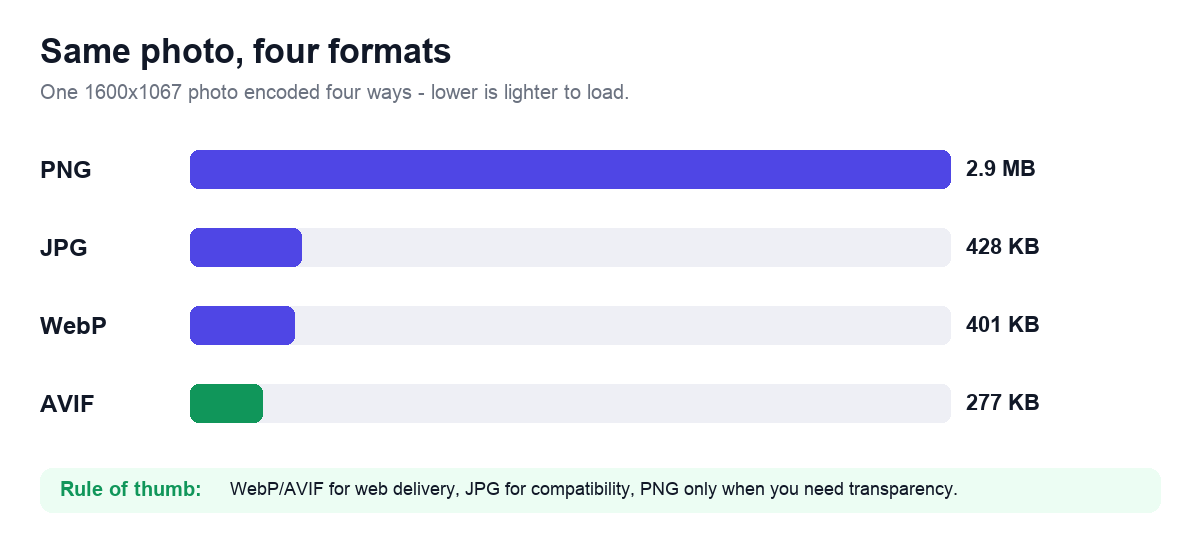
JPG is still useful for broad photo compatibility. PNG remains important for transparency and crisp graphic edges. WebP has become the practical default for many modern website images because it balances size and quality well. AVIF can be even more efficient, but support, tooling, and workflow comfort still matter. That means the “best” format depends on what the image contains and how the site publishes it.

The right question is not which format is newest. The right question is which format fits the asset, the browser audience, the publishing workflow, and the performance budget of the page.

  • Use JPG for broad compatibility and photographic sharing.
  • Use PNG for transparency, screenshots, logos, and UI graphics.
  • Use WebP for many everyday web images where size matters.
  • Use AVIF when you have checked compatibility and want stronger compression gains.

Real examples

Consider these common scenarios: A product photo for a category page often works best in WebP or JPG depending on the fallback requirements. A screenshot in a technical article may still need PNG or lossless WebP so labels remain sharp. A logo or transparent badge should not be forced into JPG just because it is common. These are the kinds of examples people actually search for, and they show why direct answers are more useful than abstract file-format definitions. The same source image can reasonably end up in different formats depending on whether the target is an article image, a marketplace upload, a social card, or a design handoff.

When you review your own workflow, ask what will happen next. Will the file be edited again, published to the open web, sent by email, or passed into a system with rigid file requirements? The article keeps returning to that question because it is the simplest way to avoid format mistakes that look fine in isolation but fail in production.

SEO and website performance angle

The best website format is the one that supports smaller, right-sized media without harming clarity. That contributes to a faster page and a better user experience. For Google Search, the format itself is not a ranking signal in isolation. What matters is whether the image contributes to a faster, more stable, more helpful page experience. If the wrong format makes the page heavier, blurrier, or less usable, that can show up indirectly in engagement and performance metrics. This is where image format decisions overlap with technical SEO in a very practical way.

A content site that explains these tradeoffs earns more trust than one that only gives users a converter. That is why comparison articles are valuable for AdSense review as well: they prove there is original, explanatory material on the site, not just a collection of utility endpoints.

Developer and workflow angle

Engineering teams should set clear rules for each image slot so editors and marketers do not make the format decision from scratch every time. Developers, SEO teams, and content operations staff benefit from predictable format rules because those rules scale across templates, image slots, and contributors. If you can explain to an editor when to use PNG, JPG, WebP, or AVIF, you reduce the number of bad uploads before they ever reach production.

This article therefore treats format selection as a workflow standard. The goal is not only to answer the immediate question, but to leave the reader with a durable rule they can apply on the next batch of content, the next campaign landing page, or the next editorial upload sprint.

Common mistakes

The most common errors in this comparison are not technical edge cases. They are ordinary workflow mistakes: people convert everything to one format because it feels modern, they forget about transparency, they ignore actual display dimensions, or they ship giant originals and then blame the format when the page is still heavy. Those mistakes are easy to avoid once the decision is tied back to the destination.

  • Treating AVIF as mandatory before checking actual support and workflow cost.
  • Using PNG for photo-heavy site media without a reason.
  • Optimizing the format but ignoring oversized dimensions.
  • Assuming one format should serve every asset on the site.

Tools that help

After deciding which format fits the job, the next step is usually practical: convert the file, resize it to the layout, compress it to a realistic weight, and remove metadata if the image is being shared publicly. That is why the articles in this section always link directly to the relevant browser-based tools instead of leaving the user with advice and no way to act on it.

The goal is a complete workflow. Read the comparison, apply the rule, and finish the job in the same visit.

Checklist Before You Publish

Before you ship the final asset, review the destination again. Is the image being used on a website, inside a social platform, inside email, or in an upload form with strict limits? The answer determines whether the recommended format, dimensions, and compression settings still make sense. Many image mistakes happen because the workflow changes at the last minute while the export settings do not.

Also review the image on the surfaces that matter most. A result that looks clean on a large desktop preview can still feel soft, cramped, or unnecessarily heavy on mobile. That last check is usually where the difference between a merely functional image and a polished publishing asset becomes obvious.

  • Match the file format to the real destination instead of the source habit.
  • Resize oversized images before forcing more compression.
  • Check the result in the layout, feed, form, or preview where users will actually see it.
  • Keep the original source separate from the final delivery copy.
  • Use the related tools below if the current article workflow still needs another step.

How To Apply This Advice On The Site

The simplest way to use the guidance in this article is to turn it into a repeatable workflow. Start with the destination, not the source habit. Decide whether the image is heading to a website, social feed, email, marketplace, document, or upload form. Then choose the frame, dimensions, format, and compression level that fit that destination. This order prevents the most common image-prep mistakes because it forces the decision to follow the real publishing context.

It also improves team consistency. Once a workflow is documented, editors, marketers, and developers stop improvising on every file. Pages become lighter, previews become cleaner, and the site feels more deliberate overall. That practical consistency is one of the clearest ways an image utility site can add value beyond the tool itself.

Example Screenshots

Best Image Format for Websites in 2026 visual
Reference visual tied to the topic focus of this article.
Image Format Converter screenshot
Use Image Format Converter as the practical next step after reading.

Related Tools

Final Recommendation

Best Image Format for Websites in 2026 should leave the reader with one durable rule: let the destination drive the image decision. That means choosing the format, dimensions, crop, and compression level based on the real publishing surface, not on whatever the source file happened to be. Once that rule is clear, image work becomes faster and far less random.

That is also why the site pairs tools with long-form explanations. The utility solves the mechanical task, but the surrounding article explains the reasoning well enough that the next image decision becomes easier too. When a page can do both, it becomes more useful to readers and more defensible as high-value content.

About the Author

ImageConverterTool Editorial Team is the byline used for the site editorial workflow. The team focuses on technical SEO, browser-side image processing, mobile page speed, and practical publishing guidance for image-heavy websites.

The editorial team documents practical image workflows for websites, ecommerce teams, publishers, and marketers, with a focus on browser-side processing, page speed, and privacy-safe sharing.