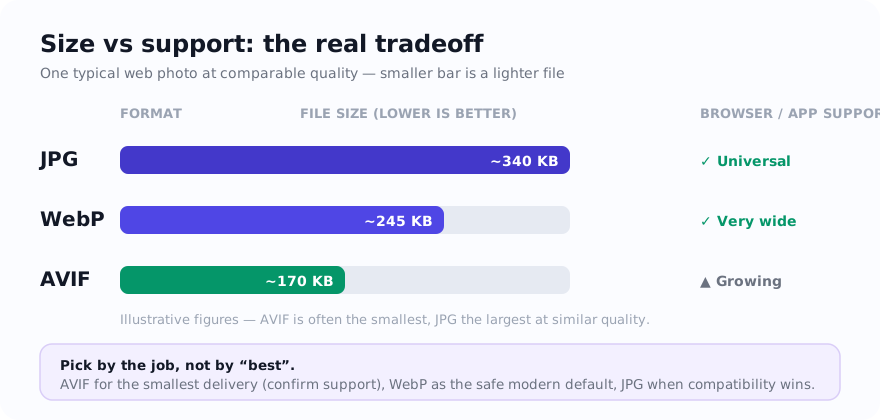
Quick answer: keep JPG in the comparison when the destination lists it, test WebP for site-controlled delivery, and test AVIF when its measured byte saving justifies the added workflow and support checks.
How JPG, WebP, and AVIF trade-offs differ
| Format | Best for | Main strength | Main tradeoff |
|---|---|---|---|
| JPG | Simple photo workflows and broad compatibility | Common in photo and legacy workflows | No transparency and weaker compression efficiency than newer formats |
| WebP | Modern web delivery for photos and graphics | Good balance of size, quality, and support | Still not ideal for every offline or legacy workflow |
| AVIF | Performance-focused web delivery | Can be efficient for tested web delivery | Support and workflow compatibility remain less universal |
Where AVIF shines
AVIF is worth testing when delivery size matters more than editing convenience. It may reduce bytes for some image-heavy websites, ecommerce category pages, and landing pages, but the result depends on the source, encoder, settings, and matched visual-quality judgment.
The catch is workflow friction. AVIF is not always the friendliest choice for older software, conservative CMS pipelines, or teams that want predictable compatibility without extra checks.
Where WebP can be a practical web option
WebP can be a useful middle ground for site-controlled delivery. Depending on the image and encoder, it may reduce bytes compared with a JPG copy, and it supports transparency. Check the actual output and every receiving browser, CMS, editor, or upload path that matters.
For blog images, product shots, article thumbnails, and marketing assets, compare WebP with the source format rather than adopting one format across the whole workflow without testing.
Why JPG still matters
JPG remains useful because compatibility is still a real business need and many upload forms, older tools, and client workflows list it. Use a JPG delivery copy when the specific destination accepts it, then verify the file in that workflow instead of treating any format as a guaranteed handoff.
JPG is also simple for photo workflows. If the asset is not destined for performance-sensitive web delivery, the effort of moving to AVIF or WebP may not pay off.
How to decide quickly
- Keep JPG in the test when the destination lists it or the file moves through an older workflow that you have verified.
- Compare WebP when you control website delivery and have checked the required browsers and publishing pipeline.
- Compare AVIF when payload reduction matters and the delivery environment has been tested with it.
- Keep a fallback strategy when AVIF is part of the stack but some destinations may not handle it.
AVIF, WebP, and JPG comparison mistakes
- Converting everything to AVIF without checking whether the destination platform accepts it.
- Keeping heavy JPG files on a website when WebP or AVIF would reduce payload meaningfully.
- Using JPG for transparent assets that would be better served by WebP or PNG.
- Switching formats before resizing, when oversized dimensions are the real reason the file is heavy.
Test JPG, WebP, and AVIF with one source
Start with the destination. If the asset is for a modern website, compare WebP and AVIF. If it is for a broad upload workflow, keep JPG in play. Resize first, then export, then compress if needed. That usually produces better results than changing formats blindly.
On this site you can test these paths with JPG to AVIF, PNG to AVIF, JPG to WebP, and Compress Image.
Sources and verification
- MDN image file type and format guide — current format capabilities, compression modes, transparency, and browser-support notes.
FAQ
Is AVIF always better than WebP?
No. AVIF can be smaller, but WebP is often easier to work with and remains a strong practical default for many websites and publishing stacks.
When should I keep JPG instead of converting?
Keep JPG when compatibility matters most, when the image is a simple photo asset, or when the delivery stack does not justify introducing a newer format yet.
Do AVIF and WebP support transparency?
Yes. Both formats can support transparency, which is useful for graphics and overlays that need a modern compressed format.