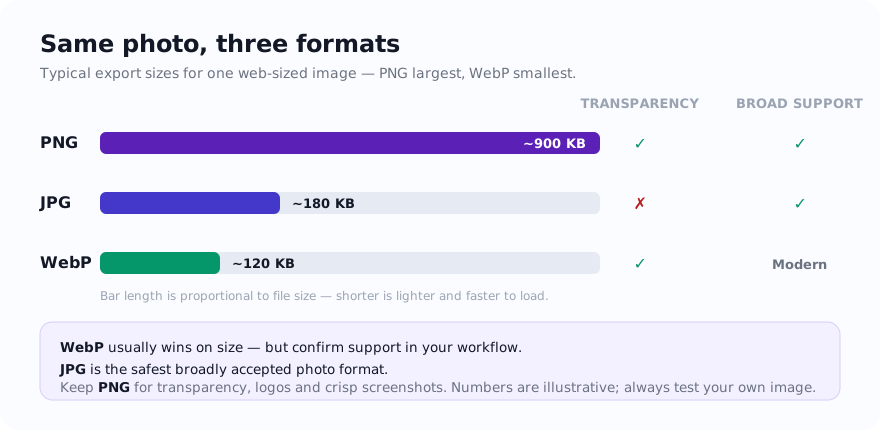
Practical rule: For a site you control, compare WebP with JPG for photographs and with PNG for transparent or sharp-edged graphics. For third-party uploads, follow the destination's current format list.
Why these three formats still matter
JPG remains common because it is simple, widely supported, and efficient for photographs. PNG remains important because it handles transparency and sharp-edged graphics reliably. WebP sits in the middle as a modern web-focused format that often produces smaller files than either JPG or PNG for similar visual output.
If you publish content online, the best format is rarely a universal answer. It depends on what kind of image you have, how important compatibility is, and whether page speed is one of your priorities.
Quick comparison
| Format | Strongest use case | Main advantage | Main limitation |
|---|---|---|---|
| WebP | Modern websites, mixed image types | Often smaller file sizes | Some older workflows still prefer legacy formats |
| JPG | Photos and easy compatibility | Small files for photographic images | No transparency and visible artifacts at low quality |
| PNG | Transparency, screenshots, logos | Sharp detail and alpha transparency | Larger files, especially for photos |
When WebP wins
WebP is worth testing for website delivery because it can reduce bytes for some photographs and graphics while also supporting transparency. The result depends on the source and encoder, so compare actual files and visual detail rather than assuming a smaller or better output.
For many publishers, the easiest workflow is to keep an original working file in JPG or PNG, then export the web version as WebP. That preserves editing flexibility while still serving lighter assets to visitors.
When JPG still makes sense
JPG remains common in photo editors, upload forms, email workflows, and content-management systems, but acceptance is destination-specific. Use it when the receiving specification lists JPG and a lossy photographic copy is suitable.
If you share files through mixed software, test one JPG in the actual workflow before converting a batch and keep the originals.
When PNG is worth the extra weight
PNG is the format you keep reaching for when visual precision matters. Logos, badges, user-interface elements, transparent overlays, exported charts, and screenshots with small text typically look cleaner as PNG. If you publish tutorials or product walkthroughs, PNG is often the right format for step-by-step screenshots because text and edges stay crisp.
Example decisions
- Blog header photo: start with JPG or export directly to WebP.
- Transparent brand logo: keep it as PNG or WebP with transparency support.
- Admin dashboard screenshot: compare PNG with WebP, paying close attention to small text and lines.
- Product gallery for a storefront you control: compare JPG and WebP at the intended display size.
- Marketplace upload that only accepts classic formats: JPG for photos, PNG for graphics.
How to choose without overthinking it
If the image is mostly photographic, test JPG and WebP. If the image contains transparency or crisp UI detail, test PNG and WebP. Then compare the actual file size and visible quality at the dimensions you plan to publish. That is usually more valuable than relying on format reputation alone.
On this site you can use PNG to WebP, JPG to WebP, and Compress Image to test the result in a minute.
Related guides
Sources and verification
- MDN image file type and format guide — current format capabilities and browser-compatibility notes.
FAQ
Is WebP always smaller?
Often, but not always. The source image, compression settings, and dimensions still matter. Testing the real output is the best approach.
Should I replace every PNG with WebP?
No. Some graphics still benefit from PNG, especially when you need a predictable lossless asset for editing or handoff.
How should I choose a format for compatibility?
Check the receiving app or upload form. JPG is commonly listed for photos, while PNG is commonly used when alpha transparency or lossless storage of rendered pixels is required; neither is guaranteed for every destination.